Hot Podcasts You Need to Put In Your Ear

Many of my workshops and classes specialize in podcasting or include podcasting tips and techniques.

The following is a list of recommended podcasts to give you a taste of what is out there, the styles and techniques that have proved successful, and those you should add to your listening habit. Continue reading

How to Set and Manage Excerpts in WordPress

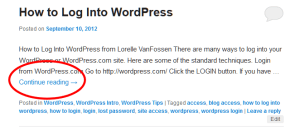
Example of a post excerpt on a multiple post pageview in WordPress with the continue reading link.There are three types of basic pageviews on WordPress: front page, single post or Page, and multiple posts. These are the different ways that content is presented within a WordPress site.

A single post or Page pageview shows the entire content. A multiple post pageview (multi-post) may show the full content of each post or an excerpt.

Most WordPress Themes automatically display excerpts on specific pageviews such as Archives, Categories, Author, and Search, but leave the decision to show the excerpt or full post on the front page of the site up to the user.

By default, WordPress displays the first 55 words of a post as the excerpt length.

This tutorial covers how WordPress handles excerpts. Continue reading

Blog Writing: Imagine You’ve Been Blogging for the Past Five Years

Can’t think of anything to blog about?

When choosing your blog topics, realize you could be blogging about this topic for years, coming up with new ideas all the time, sometimes daily.

Two photographs of a cat looking out the window of a house, from Band of Cats site.I recently found Band of Cats, a site by an owner of 4 cats, stuffed with funny cat pictures of their own cats plus any other cats, and cat stories, they can find on the web. The first post was July 27, 2007.

While Band of Cats doesn’t publish daily, though they did through most of 2008, they continue to update their site with cat art, cat pictures of the month, holiday cat pictures and items, cat products, and more. While they publish irregularly now, that’s still a huge commitment to the subject of cats.

Think about your own subject matter and imagine you’ve been blogging about it since July 2007 (or pick another date). What would your blog have covered during the past five years?

Usually, we have to project into the future what topics we would blog about. Why not take this backwards and imagine what you would have blogged about if you had been blogging about something for the past five years.

The Basics You Must Know About a WordPress Theme

code wordle - group of words that are synonyms and types of code.In 2005, WordPress became modular separating the design and architecture from the core programming code.

Today, a WordPress Theme contains files called template files that hold the architecture of the site and template tags, code that initiates actions within the site and data from the database. The design is applied through a stylesheet, holding the instructions for the colors, images, and look and feel of the entire site.

This tutorial covers the basics of the structure of a WordPress Theme and standard customization options.

The Structure of a WordPress Site
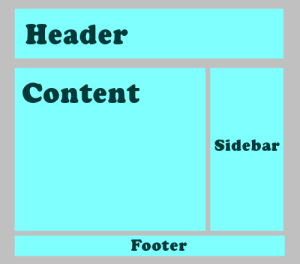
WordPress Example site featuring the layout basics of header, content, sidebar, and footer.Like all websites today, a WordPress site contains a background area, header, sidebar(s), content area, and footer.

The background area is considered the canvas that the site’s structural and design elements rest. It is usually a solid color, pattern, texture, or a design that does not overwhelm the rest of the content and design elements.

The header area content is set from within the WordPress Administration Panels through the Settings > General for the site title and site tagline.

The header art image is set from within the Appearance > Custom Header Image. WordPress now permits a wide range of images and image sizes to be used as the custom header image, and permits some level of cropping and positioning.

The sidebar(s) contain navigation, information, and design elements that complement the site’s purpose and content. In WordPress, this information is held in WordPress Widgets, modular content elements that can be moved around in the various sidebars, footers, and occasionally the header area. These are accessed and modified in Appearance > Widgets.

The footer is located at the bottom of the site. It usually features the name of the WordPress Theme and its author to give them credit, and the words “Powered By WordPress” with a link to or . It may also feature footer Widgets accessed through Appearance > Widgets > Footer.

The content area holds the content of the page depending upon the request of the user to view the front page, a Page, a single post, a search, categories, tags, author posts, archives, and other multiple post pageviews. Continue reading

The History of WordPress

WordPress logo began with a humble question from to the world in January of 2003:

My blogging software hasn’t been updated for months, and the main developer has disappeared, and I can only hope that he’s okay.

What to do? Well, Textpattern looks like everything I could ever want, but it doesn’t look like it’s going to be licensed under something politically I could agree with. Fortunately, b2/cafelog is GPL, which means that I could use the existing codebase to create a fork, integrating all the cool stuff that Michel would be working on right now if only he was around. The work would never be lost, as if I fell of the face of the planet a year from now, whatever code I made would be free to the world, and if someone else wanted to pick it up they could. I’ve decided that this the course of action I’d like to go in, now all I need is a name. What should it do? Well, it would be nice to have the flexibility of MovableType, the parsing of TextPattern, the hackability of b2, and the ease of setup of Blogger. Someday, right?

Mike Little in England responded to the 18 year old in Houston, Texas:

Matt,
If you’re serious about forking b2 I would be interested in contributing. I’m sure there are one or two others in the community who would be too. Perhaps a post to the B2 forum, suggesting a fork would be a good starting point.

By May 30, 2003, the world of web publishing was changed forever.

It didn’t happen overnight, but it happened fast.

As explained in the About WordPress on the , the online manual for WordPress Users:

WordPress started in 2003 with a single bit of code to enhance the typography of everyday writing and with fewer users than you can count on your fingers and toes. Since then it has grown to be the largest self-hosted blogging tool in the world, used on millions of sites and seen by tens of millions of people every day.

Everything you see here, from the documentation to the code itself, was created by and for the community. WordPress is an Open Source project, which means there are hundreds of people all over the world working on it. (More than most commercial platforms.) It also means you are free to use it for anything from your cat’s home page to a Fortune 500 web site without paying anyone a license fee and a number of other important freedoms.

WordPress is unique because it is an open source project created by the users, its own community. All these years later, little has changed. In August of 2005, with the creation of , the free hosted version of WordPress, was created, a commercial company dedicated to all things WordPress and supporting the WordPress Community. Continue reading

What You Must Know About Writing on the Web

1975.

While that number might mean different things to you, like your birthday, an anniversary, graduation year, part of a lottery number – to me it represents a quota.

Several years ago, a fan counted up all the articles I wrote every year and came up with an estimate of 1,975 articles published annually across multiple sites.

I was stunned. No, staggered. I now had a number. I didn’t know what to do with it. It freaked me out. That’s 164 articles a month. Thirty-eight articles a week. Five and a half a day. That’s a lot.

Don’t even ask to add up the word count. I couldn’t. Yet, the same person estimated that I wrote 2,370,000 words annually.

It took a long time for me to come to grips with that number. I worried when I became smarter with my time and dropped some of the online columns and magazines to concentrate on more influential sites. What if I couldn’t keep up with the numbers?

After a while I gave up and realized it was just a number. Like a random phone number or birth date. Another number not to worry about. Much.

Along the way to generating all those words every year for many years on end, I learned a few things worth sharing. Continue reading

What is the Difference Between a Website and a Blog

Colorful text says blog versus website.We live in a world of ever changing terms and jargon. Let’s see if this will add to the confusion or clear things up when it comes to what to call a blog and what to call a website.
A website, or site, is a collection of web pages.

A site is designated by its domain name, the part of the address or URL that defines the site such as WordPress.com, WordPress.org, or lorelle.wordpress.com.

A web page is any page on the web, usually found within a website.

A web page address is an extension of the domain name that points to the web page location on the site, such as example.com/article-title or example.com/2014/03/21/article-title/.

A blog is a site with content displayed in reverse chronological order.

These are the facts. A site can be a blog and a blog is a site.

However, there are the myths that we have to deal with. Continue reading

Web Design: Tools, Color Wheels, Charts, Theories, and More on Color

Colored ball in a quilt of colors.Most business owners don’t consider the importance of color when thinking about promoting their business. They just want the colors to match their business cards or logo.
When it comes to choosing colors for your website, it can be as easy as planning the colors to paint the rooms in your house. It begins with some color theory, then pull out your old color wheel and give it a spin. Right?

Well, it would if colors on the web were that easy.

In order to understand how colors work in web design, you need to know some important concepts.

I’ve put together this summary of resources to support these and included many online free tools, color charts, color wheels, and more to help you learn more about how web colors work and how to choose colors for your web design or WordPress Theme.
Continue reading

Web Page Annotation and Markup on Live Web Pages

Teaching web publishing with HTML, CSS, WordPress, etc., and working with clients, I long for the ability to just look at a web page or PDF and draw on it. Point out what works, what doesn’t, editing notes, and somehow share it or preserve it. Or make notes. To scribble a note that says “I need to remember this” or “this is cool!”

Well you can.

HongKait offers “Top Web Annotation and Markup Tools,” a huge list of tools that allow you to annotate – write on – web pages. You can highlight sections, draw on them, doodle, whatever.

You can instantly share or save your annotations.

Think of the possibilities. You are working on a WordPress Theme with a client. They can scribble on the page making notes while you are chatting about it on the page at the same time.

Developing a WordPress Plugin? Imagine running tests with this with this level of collaboration. “What if I over it over here? How does this look to you?”

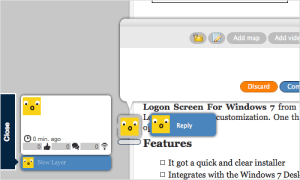
Layers is a tool that allows you to have a conversation on a web page with annotations and image shows the conversation and graphics.In one example, Layers, the tool allows you to add sticky notes, tweets, maps, videos, and images on web pages. Comments can be public or private. You can invite others to participate in an ongoing discussion of the web page to make it highly collaborative. Oh, this so is going to work out nice for students and clients.

Some of these are online apps, some are downloadable programs, and others are web browser extensions and add-ons. There are tons to choose from.

I’m going to use some of these in future classes to markup homework assignments, labs, etc. And what until my clients see these. Wow!

How to Choose a WordPress Theme

When it comes to choosing the right WordPress Theme, there is a right way and a wrong way. And both may be right for you.

First, let’s look at what people look for and what influences them in the decision process with a WordPress Theme, and the myths of their reasoning.

Comparing the same 2011 WordPress Theme - the light and the dark version - totally different.

The default WordPress 2011 Theme has two versions, dark and light. By changing the background image, these two sites on the same Theme are completely different.

How much does it cost?

First of all, the majority of WordPress Themes in the WordPress Theme Directory are free. Before you start investing in a WordPress Theme, stick with free Themes so you can test drive them.

If you fall in love with one and lack the web design experience or time to modify it, contact the author and hire them to fix this to your liking.

A paid or premium WordPress Theme is no better or worse than a free Theme. Don’t believe the hype. You are usually paying for support or additional features you may or may not need. Price does not dictate quality. Continue reading

How to Schedule Your Posts in WordPress

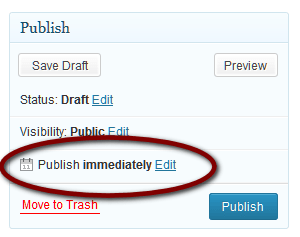
Example of the Publish Immediate, future or schedule post feature of WordPress.To schedule a post or Page to publish at a time before or after this moment, you may use the Schedule feature in WordPress.

  1. Edit or Add New post or Page.
  2. In the Publish panel of the screen, go to Publish immediately.
  3. Click Edit.
  4. Set the Month, Day, Year, and Time.
  5. Click OK.

WordPress Schedule future post feature allows you to set the date and time the post or Page will publish.If the post or Page is a draft, the Publish button will change to read Schedule.

If the post or Page was published, it will say Update.

Click this when you are ready to update or publish the post or Page. Continue reading

WordPress PDX Meetup October 29, 2012

The next Portland WordPress Meetup is October 29, 6:30PM, at the US Bancorps Bldg. in downtown Portland. Aaron Hockley, noted photographer and WordPress expert will be covering “Supercharge Your WordPress.”

Aaron spoke at my last WordPress class at Clark College and is the founder of WordCamp Portland (PDX), an annual WordPress event in Portland.

I highly recommend attendance.

For those already familiar with the code, WordPress Themes, and Plugins, a second meeting will be Tuesday, October 16 at 6:30PM at the US Bancorps Bldg, and be focused totally on the code and developer issues. See Peer Code Review for more details.

WordPress Introduction Course at Clark College Continuing Education October 16, 2012

Starting October 16, 2012, I’m presenting the Introduction to WordPress at Clark College Corporate and Continuing Education in Vancouver, Washington.

The CTEC 280 Clark College WordPress Introduction course continues as a four credit course. This is the college level course for WordPress users wanting to learn how WordPress works and how to use it better for half the price and no degree credits or college registration required.

REGISTER:
Clark College Corporate and Continuing Education
The Introduction to WordPress
6-8PM October 16 – December 6
Columbia Tech Center in Vancouver, Washington
$299 Item # F257
Register: Online or call (360) 992-2939

The Clark College Corporate and Continuing Education program, The Introduction to WordPress, is a slightly scaled down version of the full credit course. It is a thirty hour course designed for anyone looking to learn how to use WordPress for a personal or business website. It covers the basics on how to use the WordPress platform including installation, content management, configuration, SEO, and user experience strategies. The course also covers more advanced areas including WordPress Themes, Plugins, and advanced settings. No prerequisites are required, though familiarity with web browsers and web pages in general is highly recommended.

The Clark College CTEC 280 WordPress Introduction course will be offered Winter Quarter. If you are interested in the course as part of a degree or business education course, contact Reesa McAllister, CTEC offices, at 360-992-2456 to learn how to register and/or get on the waiting list for the class announcement.

What is a Website Call to Action?

Call to action button called click me with quote that says go on, you know you want to.What is a “call to action” on a site?

Call to action in web design — and in user experience (UX) in particular — is a term used for elements in a web page that solicit an action from the user. The most popular manifestation of call to action in web interfaces comes in the form of clickable buttons that when clicked, perform an action (e.g. “Buy this now!”) or lead to a web page with additional information (e.g. “Learn more…”) that asks the user to take action.
Call to Action Buttons: Examples and Best Practices by Smashing Magazine

It is literally a visual hint (or shout) that encourages a user to click or take some form of action.

Calls to action are used to:
Continue reading

Public Domain, Free Photography and Images for Your Blog

Originally published on Lorelle on WordPress and used here with permission. This list is for my classes and workshops needing public domain, royalty free images for their projects.

Colorful brain scan of a mouse - US Science Departments, public domain photographs

Colorful brain scan of a mouse.

I’ve been collecting a variety of resources for free photographs to use on your website and blog. These images are, for the most part, free to use, but may have copyright and usage restrictions. Some may require registration, use only on non-commercial sites, and/or a link back to the source. Others may require more. Check thoroughly for the specific usage rights before using any of these images.

Just because you select a filter for public domain and royalty free images on a Google Image search does not mean these images are actually public domain and royalty free. Check. Ask first, they might say yes.

is a major resource for images, but many of these have restricted use. Not every image on Flickr or the web is free to use. Check thoroughly for usage rights, and if in doubt, get permission or don’t use the image. Check out Flickr’s Public Domain Photos’ Photostream for images specifically marked as public domain.

Autumn Leaves - Morgue Files - public domain free photographs.The images featured range from people, places, wildlife, and space, as well as textures, patterns, and artistic graphic images. These free photos sites listed may have nude or violent images, though I did my best to exclude image sites which specialize in those.

One of the best, kept up-to-date lists for images and graphics in the public domain for free use is Wikipedia:Public domain image resources. I usually start my search from their list, which includes government collections and resources, special subject-based collections, and more.

Continue reading