The Basic Structure of a Blog Post

There are many ways to present a post or article on a web page. This tutorial will cover the basic formatting, styles, and structure.

The structure of an article or content on a web page is the same for any web publishing platform. This article focuses specifically on WordPress but the principles apply whether you are on Blogger, Google+, LinkedIn, Drupla, Joomla, Facebook, or a forum.

If an article is long, and this is, and divided up into separate sections, a table of contents consisting of jump links that jump down to the section the reader wishes to get to first, or second, or whatever their reading preference might be.

The table of contents maybe a list within the article or featured in a box aligned to the right or left of the content area with text flowing around it, best left to those with some HTML and CSS skills.

Article Table of Contents

WordPress Tip: Every WordPress Theme handles the basic elements in a post differently, making the headings stand out in a variety of ways, adding borders around images or not, adding design elements to a blockquote…the list is long.

I recommend that you test your own WordPress Theme by writing a test post following the examples in this article, or you may use the Sandbox Post for Testing WordPress Themes. It is a text file with HTML code representative of all the HTML tags found in a blog post.

Formatting the Post in WordPress

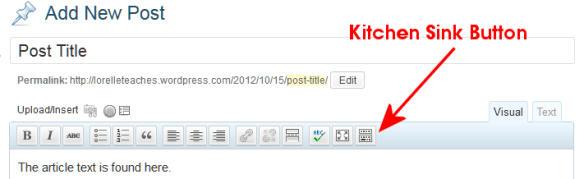
Before we begin, I will be making references to the formatting toolbar found on the post and Page Edit Screens. It is blow the post title area and directly above the content textarea where you will write your post.

The WordPress Visual Editor Toolbar featuring the Kitchen Sink Button which expands to feature a second row.

By default, you see only one line of buttons in the Visual Editor. The last button on the row is called the Kitchen Sink or Toolbar Toggle. If you click it, a second row will drop down. Continue reading

How to Create Seamless Background or Tiled Patterns

One of the ongoing challenges web designers have is with background images. Background images are found within the background of a web page, specific DIVs, menus and navigation, sidebars, all over the place.

Example seamless pattern background image for tiles and tiling on web pages. Source - fractured-sanity.org.

A well designed pattern or texture that is seamless and tiles well is one that repeats gracefully in the background, complementing the purpose of the site and not distracting. A non-distracting background is one that is literally seamless, no distinction between the edges of the graphic. It doesn’t look like a bunch of repeating blocks. It is one smooth, evenly repeating pattern that is flexible, stretching into the background no matter what the width or length of the web page.

The process involves developing graphics that, when tiled together, appear as one single image, or a gentle repeating pattern. This is often done by selecting simple graphics and blurring the edge or positioning the elements to they bookend to each other, repeating the pattern over and over again.
Continue reading

Most Common Database and Programming Errors

WordPress, web database, and web designers need to pay close attention to these two articles from TechRepublic: “Five common programming mistakes” and “Five common database development mistakes.”

The first one deals with the most common programming mistakes, a few I’ve done myself. UI craziness and variable naming inconsistencies will often eat up my time as I resolve their issues.

The second article on database development mistakes addresses many of the issues I and others have with dealing with other people’s work. A missing mistake that should be on the list is a lack of inline documentation, the notes a developer should leave to not only remind them of what happened here and why choices were made, but informs future fixers of what is going on. Without these, we have to read the code like a book, and not everyone writes based upon readable standards. We spend too much time playing detective for the simplest of fixes.

A comment in the first article really caught my eye and sums up so much of what causes problems with the code.

This isn’t the tool’s fault — the error is between the keyboard and the chair. On the one hand, it speaks volumes about the quality of these tools that I trust them so much that I lost a lot of my vigilance; on the other hand, it is still my fault that I allow convenience to turn my brain off entirely. I have learned to slow myself down when using code completion and take the extra second or two to ensure that I have made the right choice.

The biggest problem is what is sitting in the chair – remember that next time you start blaming.

WordPress Links and Blogroll Feature Gone in WordPress 3.5

With the release of WordPress 3.5 soon, expect to see the WordPress Links feature, also known as the Blogroll, gone.

I’ve written more about this in “Blogrolls Gone in WordPress. How to Save Your Links” on .

The article includes an explanation of why as well as tips and techniques for exporting and saving your WordPress links, and how to display them in new ways within WordPress.

Tutorial: Tools for Evaluating and Testing Web Pages

There are many online tools, web browser extensions, and add-ons to help you evaluate and test web pages. We will be talking about web page validation later, but you can use these tools now to become familiar with such tools and how to integrate them into your web browser.

Most browser-integration tools are browser specific, compared to online tools which sit in web pages, accessible through any browser. Browser-integration tools include extensions, add-ons, and bookmarklets.

How to Add an Extension or Add-on to Your Web Browser

To add an extension or add-on tool to your browser:

Continue reading

Tutorial: How to Inspect, Edit, and Save a Web Page

This tutorial from the HTML Fundamentals Class I taught at Clark College in Vancouver, Washington, is a guide that will show you how to:

  • View the source code of a web page.
  • How to save a web page to your computer
  • How to view a saved web page on your computer
  • How to open a web page in your text editor
  • How to view the CSS/Stylesheet for a web page
  • How to inspect the HTML and CSS of a web page
  • How to view and edit a web page at the same time

To begin this tutorial, have your web browser and text editor open on your computer. It does not matter which browser or text editor you are using. The process is basically the same.

How to view the source code of a web page

  1. Go to a web page such as the test page for the class, Welcome to Lorelle VanFossen CTEC 122 HTML Fundamentals Class on the Clark Web Server.
  2. Right click on an empty space on the web page and choose View Page Source or View Source.
  3. The resulting popup window (or tab) will show you the underlying HTML structure of the page.
  4. You may save this to your hard drive or go back and save the entire web page to your computer.

Continue reading

Links and the Anchor HTML Tag

This is a tutorial from the HTML Fundamentals Class I taught at Clark College in Summer 2012. It applies to HTML and WordPress.

There are five basic forms of links on a web page.

  1. External Links
  2. Internal Links
  3. Jump Links
  4. Image/Multimedia Links
  5. Email Links

Link Basics

Links are the gateway to the web, the interconnected parts of the web that allows a web user to easily move from document to document.

A link consists of the following HTML tag structure.

<a title="Link to article title." href="http://example.com/article.html">Anchor Text</a>
  1. a: The HTML Anchor tag.
  2. title: It is required by US federal law and international law that all links have a descriptive title property. The value text must describe the destination link in a way that will inform the user of what the destination material is about and help them decide to click through. It should be no more than a few words and written in sentence form, a simple instructional form such as “Link to article on links.” This is read out loud by screen readers.
  3. href: The Hypertext Reference is the destination link. In general, it is typically an absolute link written with the full http: address such as http//example.com/article.html.
  4. Anchor Text: This is the text which the HTML Anchor tag wraps around. It is the visible element of the tag on the web page.

Continue reading

Truly Beautiful HTML Cheat Sheet

Chris Coyier of CSS-Tricks is one of the brilliant minds ripping and tearing web design apart and putting it back together so we understand it even better than before.

In “What Beautiful HTML Code Looks Like,” Chris shares a beautiful cheat sheet for what beautiful HTML really does look like.

Chris Coyier - CSS Tricks Cheet Sheet on creating beautiful HTML

It includes HTML5, JavaScript references, and everything you need to know to make beautiful music with your web page code.

Lorem Ipsum: Resources for Dummy Content

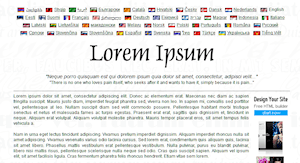
The traditional Lorem Ipsum site front page.The granddaddy of all Lorem Ipsum services is Lorem Ipsum – Lipsum generator. Lorem ipsum has been used for hundreds of years to generate dummy content for prototypes, wireframes, and galleys. Created originally for print material, it has evolved online beyond the original Latin to a variety of forms, formats, and “languages” for web use.

Selection of Lorem Ipsum types can be tricky. If you are working on a project for fun, you can use anything that tickles your fancy. If you are building a wireframe or prototype for a client, while Lorem Ipsum might be appropriate and professional, choosing dummy content that matches the intent and purpose of the site might be wiser, such as using the Cupcake Ipsum for a food site, a Lorem Ipsum alternative that features names of deserts with Latin, Pasta Ipsum – for all your macaroni product lorem ipsum needs for pasta lovers, or Veggie Ipsum – the vegetarian lorem ipsum generator for an organic restaurant or farmers market seller.

Mustard salsify welsh onion cucumber earthnut pea okra brussels sprout. Yarrow green bean gumbo garlic welsh onion wakame pumpkin wattle seed yarrow sierra leone bologi taro gram. Catsear amaranth celery wattle seed sorrel shallot pumpkin.

Onion wattle seed quandong parsley fava bean rutabaga courgette cucumber. Celery potato melon bok choy epazote zucchini artichoke fava bean beetroot groundnut desert raisin onion black-eyed pea jícama coriander celery. Lotus root spring onion endive arugula tomatillo sorrel pea dulse chickweed turnip gourd plantain cauliflower tatsoi bush tomato komatsuna rutabaga. Water chestnut endive pea sprouts gram lentil spinach chicory lettuce soybean melon turnip greens celery parsnip artichoke okra swiss chard eggplant aubergine. Water spinach garlic tomatillo tigernut catsear peanut amaranth melon garlic.

Consider Bacon Ipsum for carnivores or Cheese Ipsum for cheese lovers.

Cheese slices lancashire jarlsberg. Monterey jack fromage say cheese pepper jack fondue cheese strings blue castello cheese triangles. Cheesecake squirty cheese cheesecake fromage frais mascarpone cheese and wine edam cheesecake. Stinking bishop stinking bishop.

Manchego rubber cheese cheesy grin. Fromage frais port-salut camembert de normandie port-salut port-salut manchego camembert de normandie cheese triangles. Bocconcini bocconcini cheesy feet cheese triangles macaroni cheese cheese slices paneer cut the cheese. Edam.

Cheese on toast who moved my cheese the big cheese. Queso cheddar pecorino fromage frais parmesan mozzarella brie lancashire. Jarlsberg smelly cheese lancashire cheddar stinking bishop roquefort port-salut cheesecake. Cheese and wine fondue blue castello smelly cheese emmental pecorino parmesan.

For serious sites and clients, the traditional Lorem Ipsum is a wise choice, but like the food versions of Lorem Ipsum, there are more content specific alternatives such as Corporate Ipsum for corporate speak, and Not Lorem Ipsum for industry based Lorem Ipsum generator. These create dummy content based upon the specific industry of the company such as app development, advertising, banking, cafes, restaurants, accounting, car sales, dentists, and more.

Check out this dentist version of Lorem Ipsum.

We are a friendly team of dentists, hygienists and receptionists who work together to ensure that you receive the best treatment that you require at a time that suits you. All of our dentists are accredited by The British Dental Association Good Practice Scheme, so you can rest assured that your smile really is in good hands.

We offer NHS dental treatment to children and have a very easy private payment scheme for our adult patients. We encourage everyone to visit the dentist regularly so that we can prevent any problems from occurring and the more you visit the less likely it is that we will have to do anything “scary!”

If you are working on a static HTML site, <html>ipsum is Lorem Ipsum set within HTML tags for paragraphs, lists, forms, tables, and more. Several alternative Lorem Ipsum generators offer the option for HTML including One-Click Lorem Ipsum Generator and Loripsum.net.

Web 2.0 Ipsumr is a popular alternative Lorem Ipsum generator using nonsensical Web 2.0 startup names in keeping with the naming of things like Google, Woopra, Orkut, Zynga, Squidoo, Meebo, etc. Hipster Ipsum is for the younger generation with lines such as:

Sriracha tofu ethical, cardigan wayfarers bushwick butcher kale chips scenester mcsweeney’s sustainable jean shorts Austin. Gastropub VHS farm-to-table, lomo whatever authentic thundercats street art. Iphone gentrify pour-over street art, small batch food truck keffiyeh DIY american apparel artisan high life cray twee fingerstache. Forage mumblecore readymade next level, single-origin coffee keytar swag cliche mcsweeney’s american apparel squid chambray. Occupy vice whatever forage, brooklyn next level direct trade messenger bag pitchfork.

Why stop with clever nonsense Web 2.0 names. Use Twipsum to generate your own Twitterverse originals in Lorem Ipsum fashion.

Continue reading

Cleaning Up Your HTML and CSS Code

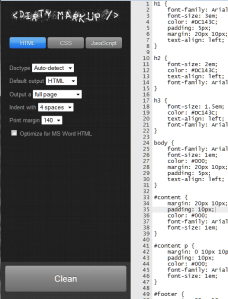
Dirty Markup interface for cleaning html, css, and javascriptTeaching HTML Fundamentals at Clark College in Summer Quarter 2012 was a step back into history and a good learning lesson for me about teaching but also about HTML.

I’m sharing a lot of the tutorials and guides I created for the class here which you can find in various categories but specifically under the HTML tag.

I’d like to share with you one of the great tools I uncovered. It’s called Dirty Markup and describes itself as the “Tidy and Beautify your HTML, CSS, and JavaScript code tool.”
Continue reading

Tutorial: Tidy Your HTML and CSS Code

The following is a tutorial for the HTML Fundamentals Class for Clark College. The information pertains to all web design, development, and WordPress fundamentals in WordPress Theme and Plugin development.

There programs designed to "tidy" your HTML and CSS into a format that meets typical standards for code layout. These take hard-to-read markup (code) and clean them up into a consistent format.

These tidy programs will not fix your broken code, but they may identify errors to help you fix it yourself.

Example of Tidy HTML cleaner before and after

Tidy programs were originally created by Dave Raggett to help clean up the HTML code. HTML TIDY now supports HTML5 and HTML exported from Google Docs, Word, and other publishing programs.

There is now a community supporting TIDY and you can learn more on TIDY Sourceforge Project.

There are also CSS TIDY programs. These work the same as the HTML versions. They include: CSSTidy and CSS Formatter and Optimiser/Optimizer (Online).

TIDY is available for cleaning up online or offline, and is incorporated into many text editors and programming editors. it is available for a variety of operating systems and in different programming languages such as Java, Perl, and Python.

To use these, follow the instructions provided by the developer. Always save a backup of the original file, called "about.bak" or something similar, just in case.

For online versions, it is as simple as uploading the file to be cleaned or pasting the file contents into the form. Copy the cleaned code and paste it into a copy of the file name or create a new version of the file and rename it to the desired name.

Learn More About TIDY

HTML and CSS Resourses List

The following was compiled specifically for the Clark College HTML Fundamentals Class but can be useful to WordPress and web design in general.

The following are helpful HTML and CSS references and resources.

W3C Guidelines and Standards

Basic HTML and CSS Resources and References

Continue reading

HTML and CSS Basics Tutorial [Video]

The following video is for Clark College’s HTML Fundamentals Class and covers the basics of HTML and CSS you need to know for building and fixing web pages. It also applies to understanding the underlying architecture for WordPress Themes.

CTEC 122 HTML and CSS Basics You Need to Know from Lorelle VanFossen on Vimeo. Continue reading

Web Browser Tips for WordPress, HTML, and Web Design

The following video contains useful web browser tips to help you speed you your browsing, WordPress, and web design work.

Basic Web Browser Tips by Lorelle VanFossen for Clark College from Lorelle VanFossen

Please note that the video refers to the Windows keyboard shortcuts using the CTRL key. This is the equivalent to the CMD key on Mac.

For mobile devices, long presses usually activate the equivalent of keyboard shortcuts and right clicks, though not all of them may be available in the apps you are using.

Here are some of the specific tips covered in the video.

  • Editing (just like in a word processor)
    • CTRL+C = Copy
    • CTRL+X = Cut
    • CTRL+V = Paste
    • CTRL+Z = Undo
  • CTRL+T = Open New Tab
  • F5 = Reload/Refresh Page
  • Zoom in and out of a web page (magnify): CTRL+Plus and CTRL+Minus
  • Right click on links on the page brings up the right click menu to access link specific options and features.
  • Right click on blank or empty spaces on a web page brings up the right click menu for page specific options and features.
  • Learn to open web pages in tabs not windows. This saves on computer memory issues and speeds up your browser process.
    • Use Mouse and Keyboard shortcuts: CTRL + Left Click on Link = Opens Linked Page in New Tab
  • Fast Navigation through Browser Tabs
    • CTRL+T = Opens New Tab
    • CTRL+1 = Goes to Tab #1
    • CTRL+ 2, 3, 4, etc. goes to that tab number
    • CTRL+Arrow = moves focus to next and previous tab
  • Working on web page design or WordPress? Refresh and you don’t see changes? You need to clear the cache and do a "hard" clearing page reload. F5 or SHIFT+F5 OR do a Cache Refresh
    • CTRL+F5 (Firefox and Chrome)
    • CTRL+Shift+R (Firefox)
    • CTRL + R (Chrome)
    • (You may have to repeat a couple times)
  • To view the source code of a web page: Right Click > View Page Source
  • Web Developer Tools