
The first Introduction to WordPress Class starts tomorrow at Clark College. If you are registered, read Preparations for the Clark College Introduction to WordPress and Introduction to WordPress Class 1: Getting Started to get ready! See you then.

The first Introduction to WordPress Class starts tomorrow at Clark College. If you are registered, read Preparations for the Clark College Introduction to WordPress and Introduction to WordPress Class 1: Getting Started to get ready! See you then.
 Talk to the serious blogging and web publishing pros, the ones turning out brilliant content fast, and you will find that they all have one thing in common. They write with HTML.
Writing with HTML in WordPress isn’t complicated nor does it require a degree in foreign languages or web development. We’re not talking about building a web page from scratch every time you publish. We’re only talking about the HTML that goes into the post content.
How much HTML do you have to learn? Only 10 HTML tags. That’s it. Less words than you probably know in Spanish or another foreign language.
The most commonly used HTML tags in the post content area are:
<a href="…">link</a><img src="…" /><h2>, <h3>, <h4>, <h5><p>Text here</p><strong> not <b> and Italic <em> not <i><ol> and <ul><blockquote> and <cite><br /><hr /><pre> and <code>How many of these do you use commonly in your blog posts? All of the ten? When was the last time you needed to put code in your blog post? Rarely, if ever. At most, you use 5 of these in most posts you publish. I think you can handle that.
The five are links, headings, bold and italic, lists, and blockquotes – unless you are a poet. Then add the line break to your collection for six easy to remember HTML tags.
Sure, there are more HTML tags you can use in the post content area, but these are the most common. Tables, font colors, etc., are rarely used and if you need to use them, you probably already know how.
Continue reading
 There are many ways to give back and support WordPress and WordPress.com, as an experienced user or a coder and developer. The WordPress Forums are the first place to begin.
There are two support forums for WordPress.
The WordPress.com Forums are dedicated to providing help to WordPress.com users. It is staffed by Automattic employees who monitor and moderate forum posts but a majority of the support comes from volunteers, fellow users who want to give back and help others but also learn more about how WordPress works.
The WordPress Support Forums are for those using the self-hosted version of WordPress or WordPress MS (Multisite). This is mostly a volunteer support forum where experienced users help others get their questions answered.
WordPress.com questions will not be answered on the WordPress.org forum, and the reverse is true. Questions must be posted (and answered) in the appropriate forum section as well.
Continue reading
The following is the list of the articles in the series I’ve written on how to manage multiple authors and contributors with WordPress.
 There are many ways to track the competition, from reading newspapers and magazines to checking them out on Alexa or other web stats and analytics sites.
Here are some articles referencing how to track the competition in a variety of ways including traditional media, social media, analytics, and legal spying.
Comparing your website to others means tracking their activity compared to yours. This might involve using an online tool that compares your site to theirs, or by checking each site individually and comparing notes. Some of the following will compare one site to another testing for a variety of data such as PageRank, keywords, traffic, and incoming links. Others will focus on a single aspect such as keywords or unique visitors. Use a variety of them to get an overall perspective on how your site compares to others.
Note: Google removed their PageRank data from the public a couple years ago. Online tools based upon Google’s PageRank data may no longer work or be supported. Please let me know if any of these are no longer active.
The following are SEO and analytics testing tools that cover specific types of testing. For example, BuiltWith tests the site and reports back with information on how the site was build, the publishing platform, supporting technologies, and other information about how the site was built.
The following are articles and sites specializing in analytics, SEO, and optimization.
 The following resources are for those who develop WordPress Plugins and WordPress Themes and wish to release them to the public and include them in the WordPress official directories, WordPress Plugin Directory and WordPress Theme Directory.
It is highly recommended that you read “A Love Letter to WordPress Plugin Authors” with tips for WordPress Plugin and Theme authors on how to ensure your audience finds your WordPress goodness.
There are many ways WordPress can integrate into social media services and networks, and many ways you can integrate those same services and networks into your WordPress site.
You can also integrate Google Maps, Google Docs, Flickr, Tumblr, and a lot of other goodies into WordPress.
There are many WordPress Plugins that make the job easier, but this article is focused on how to do it manually both for the self-hosted version of WordPress as well as WordPress.com.
The following are links to resources with more information on WordPress 3.3, the next release of WordPress due the second week of November 2011.
 Personally, I researched for two years for a solid content management system (CMS) to host my 2,000 page static HTML site. I put many to the test with great frustration and wasted time as they were bulky, too complex, had frustrating interfaces, and high learning curve language as none of them spoke the same language, both in semantics and code. In fall of 2003, I kept stumbling across mention of this WordPress thing changing the whole concept of CMS, but it wasn’t called a CMS. It was called a blogging platform.
I tried WordPress and fell madly in love. It made sense. The interface was clean and simple and it was built on a simple dynamically generated HTML and PHP framework that I could easily incorporate into my existing award-winning design. By November of 2003, my site was relaunched on the six month old WordPress web publishing platform and I never looked back.
There are many reasons to choose WordPress, as many reasons as there are different types of enthusiasts for web design, development, and code.
Continue reading
WordPress is an open source publishing platform for the web. It allows easy content management and publishing via the web browser to the web. There are four versions of WordPress.
WordPress, the self-hosted version of WordPress, is often called “dot org” or “full version.” It is the version of WordPress used by those with paid hosting services or “self-hosted.”
The is the most flexible of the WordPress versions as the user can choose from any WordPress Theme and customize it fully or create their own, and add any WordPress Plugin, script or custom code to their site. The self-hosted version of WordPress can be used by beginner or expert.
This version is appropriate for any individual or company. Continue reading
WordPress is a trademark, both in word and image. It is required by international trademark laws to use both appropriately.
WordPress is spelled with a capital W and capital P, all one word. Usages of Wordpress, Word Press, and similar spellings and capitalization is unacceptable and in violation of trademark.
The WordPress logo is a tall, “graceful” W in a circle with a blue or gray background. Other colors and some creative distortion are acceptable, but the font and height must be maintained.

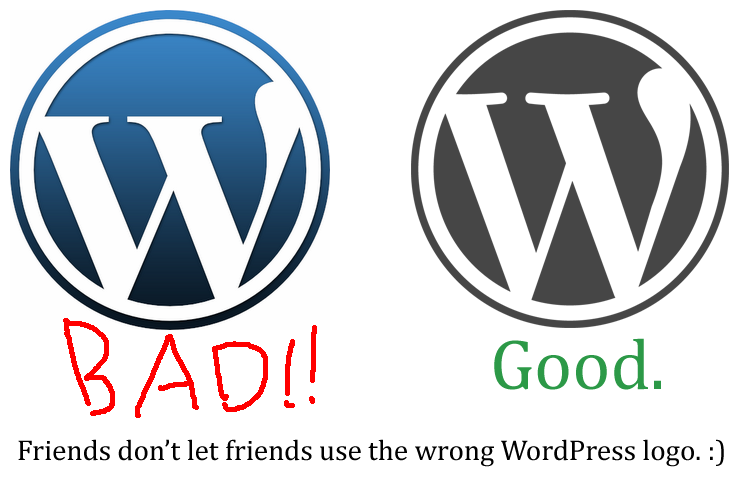
Images courtesy of Matt Mullenweg.
Theme.fm has a series of three articles on how WordPress boots up, how it moves through the process as a visitor lands on their first page on your site and a step-by-step look at the WordPress Loop.
As a visitor lands on a web page on a WordPress site, the browser begins the process of loading the visitor request to view a specific page. On that web page, there are codes that instruct WordPress to pull information from the site design files called WordPress Theme template files, from WordPress Plugins, from the database, and other code requests to literally build a viewable page instantly for the visitor. These articles dig deeply into how WordPress code works with all the various programs and options to generate that page.
 Learning from Lorelle