The First Website Revived

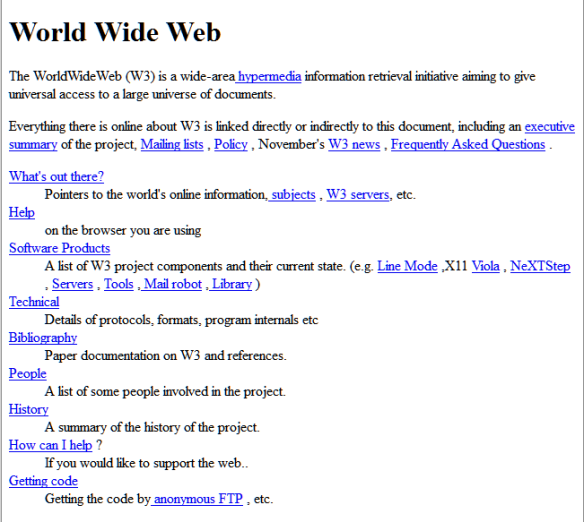
The Web as we know it went “live” April 30, 1993. The very first web page and website Tim Berners-Lee and the WWW team put online has been brought out of the archives by CERN.

First Website in the world on the web by Tim Berners-Lee and CERN team - front page.

The web page and site was reconstructed by CERN from an archive found on the W3C site, which is a 1992 copy of the first website, not the original. The research team is still searching for the original or an older version.

Mark Boulton is involved with the CERN team to help restore the first website. He described their determination to preserve this moment in world history.
Continue reading

How to Link to Posts, Pages, Categories, Tags, Authors, and Feeds in WordPress

Featured

WordPress code logo thumbnailThis is a tutorial on how to link to the various features found on a typical WordPress site.

Wish to promote an author your site? Need the link to their author pageview? Wish to link to a specific category? Want to share the link to your WordPress site feed?

There are many times when you may wish to link to a feature or function on your site. Here is a list of the various areas you may wish to link to from posts, Pages, Widgets, and in emails and social media posts to help people find information on your site.

How to Copy a Link

We call them “links” but the proper names are hypertext link and the link is created with an HTML Anchor Tag.

A well-formed link in HTML looks like this:

<a href="http://lorelle.wordpress.com/" 
title="Lorelle VanFossen of Lorelle on WordPress.">
Lorelle VanFossen</a>

It features the link to the destination, the title selector to describe the destination of the link, and the anchor text, the words visible on the page to the reader.

This is called a well-formed or properly formed link as these three items are required by US and international law for web standards and web accessibility.

To copy a link, there are two methods. The first is the most commonly used technique.
Continue reading

WordPress Site Models

Featured

WordPress serves as a web publishing platform and Content Management System (CMS). There are a variety of layouts and site organizational structures to choose from when setting up a WordPress site. These are known as site models.

There are three core site models: blog, static, and hybrid.

There are pros and cons to each one. Let’s look at each one.

The Static Site Model

Site model example of a static website, each page on the site a separate web page - graphic by Lorelle VanFossen.In the old days, websites consisted of static web pages, one web page for each article. Today’s CMS platforms like WordPress offer the same static feel and structure as a design decision.

The challenge of using WordPress as a static site takes a little thinking around the whole posts verses Pages and categories verses tags content organization options. In general, most static sites will never use posts only Pages.
Continue reading

Stats: The Analytics of Reading to the Bottom of the Page

Featured

In “How people read online: Why you won’t finish this article” on Slate Magazine, author Farhad Manjoo explores the statistics on whether or not you will read to the bottom of his article.

I’m going to keep this brief, because you’re not going to stick around for long. I’ve already lost a bunch of you. For every 161 people who landed on this page, about 61 of you—38 percent—are already gone. You “bounced” in Web traffic jargon, meaning you spent no time “engaging” with this page at all.

So now there are 100 of you left. Nice round number. But not for long! We’re at the point in the page where you have to scroll to see more. Of the 100 of you who didn’t bounce, five are never going to scroll. Bye!

OK, fine, good riddance. So we’re 95 now. A friendly, intimate crowd, just the people who want to be here. Thanks for reading, folks! I was beginning to worry about your attention span, even your intellig … wait a second, where are you guys going? You’re tweeting a link to this article already? You haven’t even read it yet!

He talked to many expert web analytics researchers and analysts about the statistics associated with reading an article on the web. The numbers are fascinating, and may change how you write your next post.
Continue reading