The Basics You Must Know About a WordPress Theme

code wordle - group of words that are synonyms and types of code.In 2005, WordPress became modular separating the design and architecture from the core programming code.

Today, a WordPress Theme contains files called template files that hold the architecture of the site and template tags, code that initiates actions within the site and data from the database. The design is applied through a stylesheet, holding the instructions for the colors, images, and look and feel of the entire site.

This tutorial covers the basics of the structure of a WordPress Theme and standard customization options.

The Structure of a WordPress Site
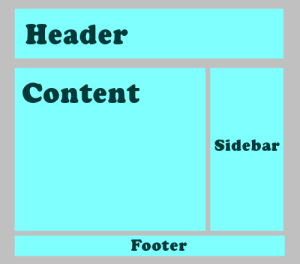
WordPress Example site featuring the layout basics of header, content, sidebar, and footer.Like all websites today, a WordPress site contains a background area, header, sidebar(s), content area, and footer.

The background area is considered the canvas that the site’s structural and design elements rest. It is usually a solid color, pattern, texture, or a design that does not overwhelm the rest of the content and design elements.

The header area content is set from within the WordPress Administration Panels through the Settings > General for the site title and site tagline.

The header art image is set from within the Appearance > Custom Header Image. WordPress now permits a wide range of images and image sizes to be used as the custom header image, and permits some level of cropping and positioning.

The sidebar(s) contain navigation, information, and design elements that complement the site’s purpose and content. In WordPress, this information is held in WordPress Widgets, modular content elements that can be moved around in the various sidebars, footers, and occasionally the header area. These are accessed and modified in Appearance > Widgets.

The footer is located at the bottom of the site. It usually features the name of the WordPress Theme and its author to give them credit, and the words “Powered By WordPress” with a link to or . It may also feature footer Widgets accessed through Appearance > Widgets > Footer.

The content area holds the content of the page depending upon the request of the user to view the front page, a Page, a single post, a search, categories, tags, author posts, archives, and other multiple post pageviews. Continue reading

The History of WordPress

WordPress logo began with a humble question from to the world in January of 2003:

My blogging software hasn’t been updated for months, and the main developer has disappeared, and I can only hope that he’s okay.

What to do? Well, Textpattern looks like everything I could ever want, but it doesn’t look like it’s going to be licensed under something politically I could agree with. Fortunately, b2/cafelog is GPL, which means that I could use the existing codebase to create a fork, integrating all the cool stuff that Michel would be working on right now if only he was around. The work would never be lost, as if I fell of the face of the planet a year from now, whatever code I made would be free to the world, and if someone else wanted to pick it up they could. I’ve decided that this the course of action I’d like to go in, now all I need is a name. What should it do? Well, it would be nice to have the flexibility of MovableType, the parsing of TextPattern, the hackability of b2, and the ease of setup of Blogger. Someday, right?

Mike Little in England responded to the 18 year old in Houston, Texas:

Matt,
If you’re serious about forking b2 I would be interested in contributing. I’m sure there are one or two others in the community who would be too. Perhaps a post to the B2 forum, suggesting a fork would be a good starting point.

By May 30, 2003, the world of web publishing was changed forever.

It didn’t happen overnight, but it happened fast.

As explained in the About WordPress on the , the online manual for WordPress Users:

WordPress started in 2003 with a single bit of code to enhance the typography of everyday writing and with fewer users than you can count on your fingers and toes. Since then it has grown to be the largest self-hosted blogging tool in the world, used on millions of sites and seen by tens of millions of people every day.

Everything you see here, from the documentation to the code itself, was created by and for the community. WordPress is an Open Source project, which means there are hundreds of people all over the world working on it. (More than most commercial platforms.) It also means you are free to use it for anything from your cat’s home page to a Fortune 500 web site without paying anyone a license fee and a number of other important freedoms.

WordPress is unique because it is an open source project created by the users, its own community. All these years later, little has changed. In August of 2005, with the creation of , the free hosted version of WordPress, was created, a commercial company dedicated to all things WordPress and supporting the WordPress Community. Continue reading

What You Must Know About Writing on the Web

1975.

While that number might mean different things to you, like your birthday, an anniversary, graduation year, part of a lottery number – to me it represents a quota.

Several years ago, a fan counted up all the articles I wrote every year and came up with an estimate of 1,975 articles published annually across multiple sites.

I was stunned. No, staggered. I now had a number. I didn’t know what to do with it. It freaked me out. That’s 164 articles a month. Thirty-eight articles a week. Five and a half a day. That’s a lot.

Don’t even ask to add up the word count. I couldn’t. Yet, the same person estimated that I wrote 2,370,000 words annually.

It took a long time for me to come to grips with that number. I worried when I became smarter with my time and dropped some of the online columns and magazines to concentrate on more influential sites. What if I couldn’t keep up with the numbers?

After a while I gave up and realized it was just a number. Like a random phone number or birth date. Another number not to worry about. Much.

Along the way to generating all those words every year for many years on end, I learned a few things worth sharing. Continue reading