
There are many ways to present a post or article on a web page. This tutorial will cover the basic formatting, styles, and structure.
The structure of an article or content on a web page is the same for any web publishing platform. This article focuses specifically on WordPress but the principles apply whether you are on Blogger, Google+, LinkedIn, Drupla, Joomla, Facebook, or a forum.
If an article is long, and this is, and divided up into separate sections, a table of contents consisting of jump links that jump down to the section the reader wishes to get to first, or second, or whatever their reading preference might be.
The table of contents maybe a list within the article or featured in a box aligned to the right or left of the content area with text flowing around it, best left to those with some HTML and CSS skills.
Article Table of Contents
I recommend that you test your own WordPress Theme by writing a test post following the examples in this article, or you may use the Sandbox Post for Testing WordPress Themes. It is a text file with HTML code representative of all the HTML tags found in a blog post.
Formatting the Post in WordPress
Before we begin, I will be making references to the formatting toolbar found on the post and Page Edit Screens. It is blow the post title area and directly above the content textarea where you will write your post.
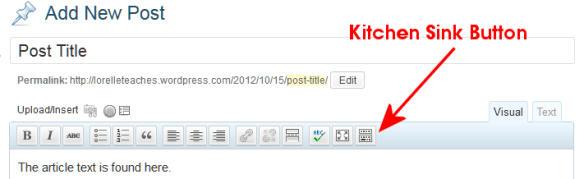
By default, you see only one line of buttons in the Visual Editor. The last button on the row is called the Kitchen Sink or Toolbar Toggle. If you click it, a second row will drop down. Continue reading

 Learning from Lorelle