Publishing Responsibilities: I’m Responsible for What I Say

I am responsible for what I say. I am not responsible for what you understand.

This is going around the web and it’s a powerful statement:

I am responsible for what I say.
I am not responsible for what you understand.

It’s a simplified version of:

I know that you believe you understand what you think I said, but I’m not sure you realize that what you heard is not what I meant.
Robert McCloskey

Yet, it goes much further.

How does this relate to social media and web publishing?

Developing WordPress Plugins and Themes for the Public

WordPress code logo thumbnailThe following resources are for those who develop WordPress Plugins and WordPress Themes and wish to release them to the public and include them in the WordPress official directories, WordPress Plugin Directory and WordPress Theme Directory.

It is highly recommended that you read “A Love Letter to WordPress Plugin Authors” with tips for WordPress Plugin and Theme authors on how to ensure your audience finds your WordPress goodness.

WordPress Plugins Submissions

WordPress Theme Submissions

Working as a WordPress Developer

Selling WordPress Themes

WordPress Social Integration

WordPress code logo thumbnailThere are many ways WordPress can integrate into social media services and networks, and many ways you can integrate those same services and networks into your WordPress site.

You can also integrate Google Maps, Google Docs, Flickr, Tumblr, and a lot of other goodies into WordPress.

There are many WordPress Plugins that make the job easier, but this article is focused on how to do it manually both for the self-hosted version of WordPress as well as WordPress.com.

WordPress.com Integration

Continue reading

WordPress 3.3: New Features

WordPress code logo thumbnailThe following are links to resources with more information on WordPress 3.3, the next release of WordPress due the second week of November 2011.

Creating a Website Feed For a Feedless Site

Feed iconThere will be times when you will want to create a feed to add to your feed reader from a site that doesn’t have a feed so you can monitor the site for changes, updated, or new content. Here are some free, online feed creation services to try. Not all create feeds from sites without feeds equally, so experiment with these to find the right one.

In general, you will want to provide the “front” page or the page with the most active content you wish to follow. For example, if you wish to only follow the WordPress information from a specific site and not the rest of their content, then you would create a custom feed for their WordPress category, subdomain, or search results.

These are not meant to replace the feeds provided by websites but to use them on sites without feeds.

Plagiarism, Copyright, and Fair Use

copyright symbolRule Number One: Ask first, they might say yes.

If it is on the web, it isn’t free.

If it is on the web, it could be free.

Everything on the web was created by someone. It took hard work. It took time, sometimes a lot of time. Hours, days, weeks, months, possibly years.

Everything on the web is copyrighted and someone owns that copyright. It is up to them to decide what those rights are.

They might want to share what they’ve created with the world but only on their space.

They might want to share it for free for use by others and allow it to be used by others as long as credit in the form of links stays with it.

They might want to share only a small bit with a link as credit for use by others. They should tell you how much they will allow to be shared before it is considered plagiarism and copyright infringement. This is called Fair Use. If in doubt, use no more than 10% or 400 words.

They might want to give it away and not care if it is linked, credited, or changed.

It is up to the copyright holder to set the terms of the sharing, copying, and usage, but understand they don’t have to. Always look for their copyright policy, usage license, or Creative Commons license and permissions to verify the rights of the copyright holder. Anything published and shared on the web is owned and controlled with all rights and usages to the copyright holder. Treat it fairly within the rules of Copyright Fair Use.

This applies to written content, pictures, graphics, images, designs, web art, web templates, web designs, video, animation, photographs, audio, podcasts, music, illustrations, artwork, downloadable files, and any other content on the web. It’s all copyright protected. Continue reading

The Social Media Firehose

A while ago I ran across the Yahoo Pipes Social Media Fire Hose, a script written with Yahoo Pipes by Joseph Kingsley. If you want to track yourself, your blog, your brand, or any keyword or phrase across the web, especially by social media sites, this is the tool for you.

The Yahoo Pipes Social Media Fire Hose searches across Twitter, Flickr, Friendfeed, Digg, various search engines, and even includes blog comments. It creates a custom feed you can then add to your feed reader.

Originally created for public relations, advertising, and marketing tracking across the online social networks and media, this is a great way to find out what others are saying about you and your blog, your brand, or anything. I’ve been using it to track information on WordPress such as WordPress Tips, WordPress Plugins, and WordPress Themes, as well as my name, blog name, and URL and feedback from various blogs I work for and with.

Continue reading

Why Choose WordPress?

WordPress logoPersonally, I researched for two years for a solid content management system (CMS) to host my 2,000 page static HTML site. I put many to the test with great frustration and wasted time as they were bulky, too complex, had frustrating interfaces, and high learning curve language as none of them spoke the same language, both in semantics and code. In fall of 2003, I kept stumbling across mention of this WordPress thing changing the whole concept of CMS, but it wasn’t called a CMS. It was called a blogging platform.

I tried and fell madly in love. It made sense. The interface was clean and simple and it was built on a simple dynamically generated HTML and PHP framework that I could easily incorporate into my existing award-winning design. By November of 2003, my site was relaunched on the six month old WordPress web publishing platform and I never looked back.

There are many reasons to choose WordPress, as many reasons as there are different types of enthusiasts for web design, development, and code.
Continue reading

What is WordPress?

WordPress logo is an open source publishing platform for the web. It allows easy content management and publishing via the web browser to the web. There are four versions of WordPress.

WordPress – Self-Hosted Version

, the self-hosted version of WordPress, is often called “dot org” or “full version.” It is the version of WordPress used by those with paid hosting services or “self-hosted.”

The is the most flexible of the WordPress versions as the user can choose from any WordPress Theme and customize it fully or create their own, and add any WordPress Plugin, script or custom code to their site. The self-hosted version of WordPress can be used by beginner or expert.

This version is appropriate for any individual or company. Continue reading

How WordPress Boots Up: A Step-by-step Examination of the WordPress Loop

Theme.fm has a series of three articles on how WordPress boots up, how it moves through the process as a visitor lands on their first page on your site and a step-by-step look at the WordPress Loop.

  1. WordPress Internals: How WordPress Boots Up
  2. WordPress Internals: How WordPress Boots Up Part 2
  3. WordPress Internals: How WordPress Boots Up Part 3 – Theme.fm

As a visitor lands on a web page on a WordPress site, the browser begins the process of loading the visitor request to view a specific page. On that web page, there are codes that instruct WordPress to pull information from the site design files called WordPress Theme template files, from WordPress Plugins, from the database, and other code requests to literally build a viewable page instantly for the visitor. These articles dig deeply into how WordPress code works with all the various programs and options to generate that page.

Creating a Social Marketing Strategies Map

The following are discussions and examples of creating a social media marketing strategies map.

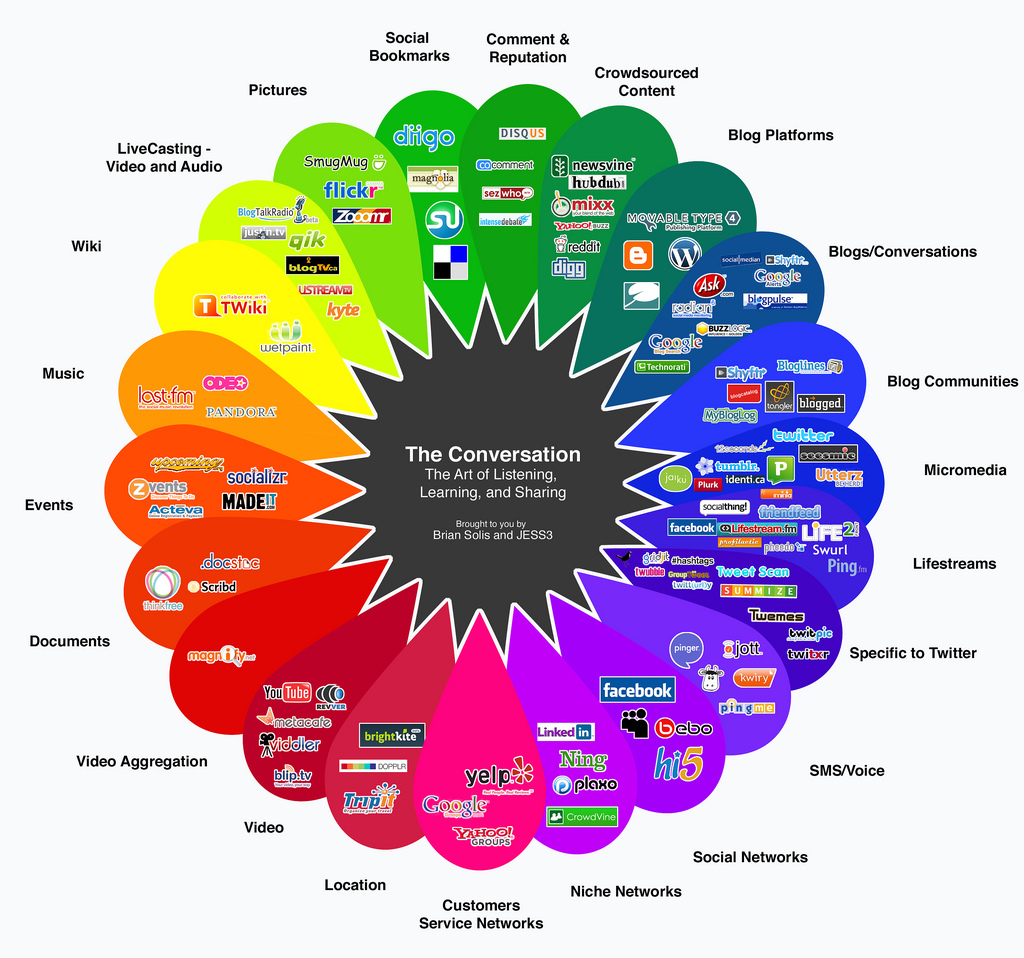
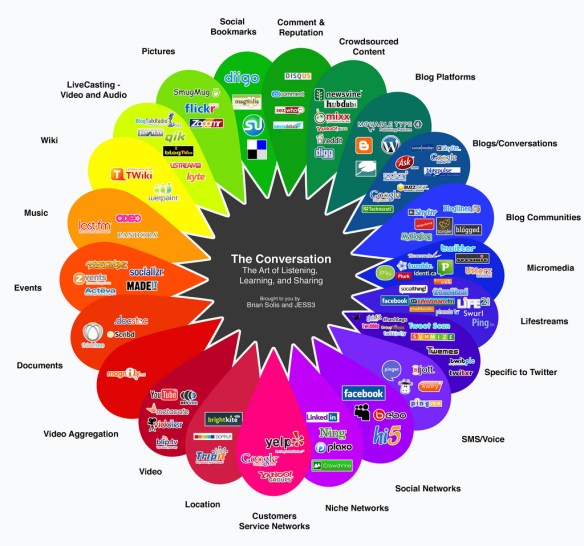
The Conversation Prism by Brian Solis and Jesse Thomas

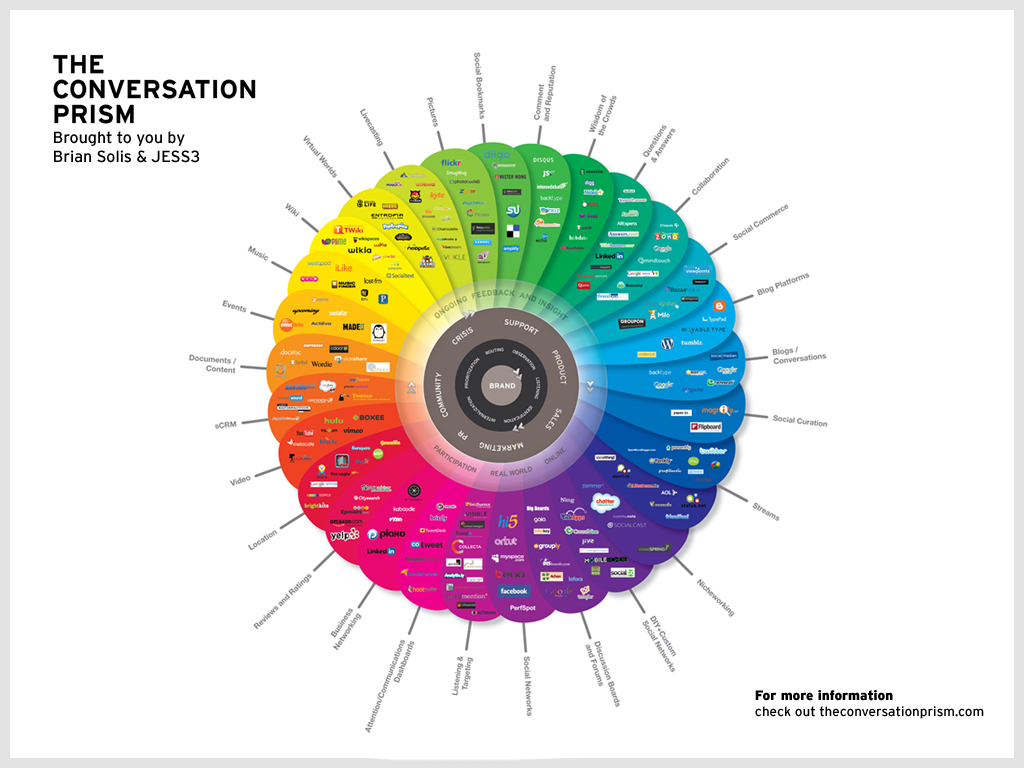
Conversation Prism by Brian Solis and Jesse Thomas v3

The Conversation Prism by Brian Solis and Jesse Thomas was one of the earliest models for helping to visualize the conversations that define the social web.

Created originally in August of 2008, it has been updated several times as social media networks and trends have changed.

The prism chart is a bit hard to see on a web page, so let’s break it down into digestible parts.

Inside the Chart

conversation prism by brian solis and jesse thomas v2The original version one and two of the Conversation Prism spelled out strategies for business communication and the social web. It bears highlighting as part of our conversation on marketing within the social web.

Version 3, shown at the top, removes the center strategies, focusing totally on listening. Many businesses don’t “get” what listening really means when it comes to the social web.

The Brand is the core of the circular chart representing the end goal: marketing the brand. From this, all things branch out as the goal must be served by the actions within the social web.

Wrapped around the inner Brand circle is a ring, called a halo, listing: Observation, Listening, Identification, Internalization, Prioritization, and Routing. These are the definitions of observing, listening, or participating in social media.

The next halo represents the “intersection of all public facing departments,” which is the business departments or titles to create a social media Customer Relationship Management (CRM) strategy. They include Customer or Product Support, Product and Sales, Marketing/PR, Community, Corporate Communications, Crisis, and Support.

Halo three is described as the completion of the conversational workflow powered by “continual rotation of listening, responding, and learning online and in the real world.” It is represented by ongoing feedback and insight, participation, online and real world relationships and communication.

The outer part of the circle highlights the specific social media services sorted by subject matter and interest such as Questions and Answers found through Quora and LinkedIn, and Wikis with Wikipedia, TWiki, Wika, and other wiki-based sites and services.

This chart and others are available through The Conversation Prism Store.

US Air Force Web Posting Response Assessment

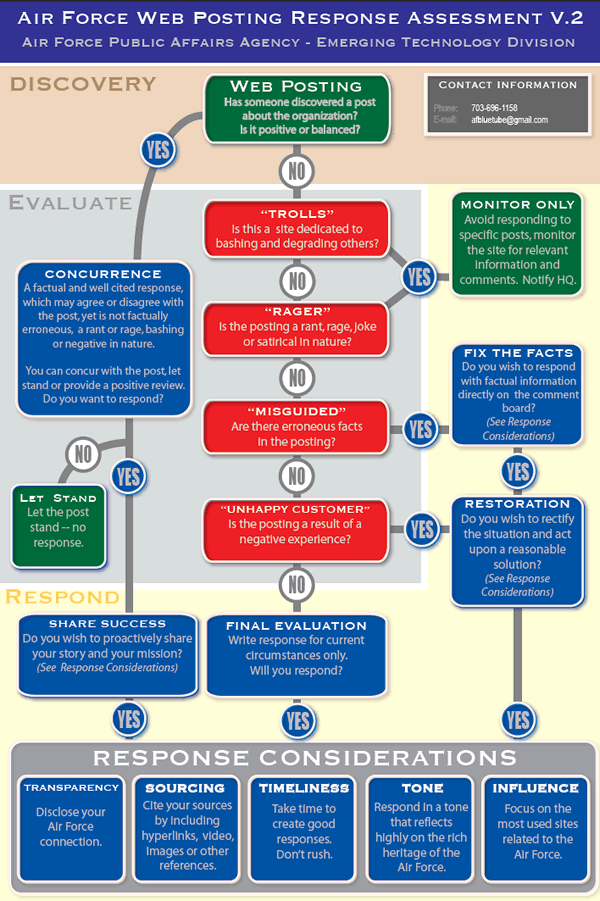
Air Force Web Posting Response Assessment v2

Source: Air Force Web Posting Response Assessment (PDF)

The Air Force Web Posting Response Assessment was created by the Air Force Public Affairs Agency’s Emerging Technology Division to create a flow chart path for responding to comments in social media and blogs. While designed for blogs and blog comments, it works across all social networks and online and off-line communications. It’s caught the attention of the social media industry as a solid strategy that businesses should consider when training their staff handling web communications and marketing and establishing clear communication guidelines.

The chart is divided into four areas: Discover, Evaluate, Respond, and Response Considerations. In reality, it covers three areas, Discovery, Evaluation, and Response, as Response Considerations are part of the evaluation.

In general, the chart explains comment responses:

  1. Before responding, consider the source of the response and their attitude and objectives.
  2. Decide how to respond based upon the attitude and objectives of the commenter.
  3. Write the response in consideration of tone, influence, timeliness, transparency, and sourcing (justification and evidence).
  4. Evaluate response and continued conversation, if any, for future considerations and actions.

Among the response options are to monitor only (let the comment stand but take no immediate action), respond with facts to fix the commenter’s falicies or support the original position, respond with a solution to rectify the situation and restore calm and reasonable perspectives, and to reinforce your position positively by “sharing success” and restating your story and mission.