
Title: Blog Struggles: When Are Too Many Comments Too Many Comments?
The following is a test article for students in the WordPress class. It was originally published in 2007 on Lorelle on WordPress and is used with permission.
 Recently, what appeared to be a thoroughly delighted fan went through my blog with a vengeance and left over 40 comments within a two day period. Each were personalized and directed to me, with enthusiastic comments and reflections on what was written. At first I was pleased, as I always am when my blog touches and teaches, but after the eight consecutive comment, I began to get suspicious. Row after row of comments all from the same person filled my Comments panel. Wouldn’t you be suspicious? Let’s assume this isn’t a clever human comment spammer and consider this is a person who is really thrilled with what they are finding and reading on your blog. Then ask yourself: When are too many comments, too many comments?
Begging for Blog Comments
Bloggers spend a lot of time thinking about how to provoke more comments on their blogs. We add “subscribe to comments” WordPress Plugins, comment feeds, and innovative comment methods to encourage comments. WordPress Themes feature pleading phrases like “No comments yet. Why don’t you be the first?” or “Care to be the first one to jump into the fray?” We write to challenge our readers, asking questions and writing combinations of words to encourage them to click away from their feed readers to jump into the pool and have their say. When a conversation strikes between two or more of the commenters, we love watching the conversation grow, bantering back and forth, passing on ideas or exchanging spitfire. We rub our hands together with glee. We started something. But what about the lone enthusiastic commenter who plows through your blog littering dozens of posts with kind words? They may or may not continue the conversation between you and the reader or the other commenters. But the words are all nice and pleasant, doing no harm. Just sitting there like a white pawn piece reaching the other side of the chess board. You know it’s a threat, but it’s a harmless pawn piece. What do you do?
Perception Versus Reality
 My perception was that this person was stuffing my Comment “inbox” with comments, trying to get my attention, or building up link juice, page ranking links. The reality was that I’m the only one who can tell this person is spamming my blog with comments. No one else sees my Comments panel. I don’t have a comments counter or public reward system that promotes who commented on what, when, and how often. I’m the only one bothered by all the comments, so who cares? I care. That’s the problem. And I’m suspicious and paranoid. I’ve been doing this online stuff for too long. I’ve been abused with the best and worst of the abusers out there, and I have the callouses and scars to prove it. It’s natural that I’m suspicious of 40 comments by one person within a few days. That’s just strange. I had many choices. I could ignore it and see if it continued. I could delete the ones that didn’t add to the conversation. I could also contact the commenter to find out their true intentions. I chose the latter. I emailed the commenter and thanked them for their comments and enthusiasm on my blog. I kept it neutral and asked if there was something in particular they were interested in that maybe they hadn’t found on my blog. The response was clearly that of a naive, new-to-the-web youngster. I now knew my enemy and it was a young girl discovering blogging for the first time and just over enthusiastic. I can live with that. We exchanged a few emails and finally I felt confident enough to mention the suspicious her many comments had originally aroused. She was embarrassed but it was a good lesson. She’s now a better commenter, leaving comments that continue the conversation not just say something to say something, and a much better blogger as she understands more about how important the conversation is on a blog.
Judging a Comment
With all the comment spam that attacks our blogs daily, along with “nice people” craving link juice in comments, it’s easy to get suspicious and paranoid about comments. In time, I’ve come up with a filter list that helps me better evaluate whether or not to keep a comment or trackback on my blog.
- What is it really saying?
- Does it continue the conversation?
- Will my readers benefit from the comment?
- Can I look at this comment for the rest of my life?
If it passes that quick test, then it stays. Especially if it passes the last question in the test. Everything else can be deleted, or if appropriate, marked as comment spam. Life is too short to struggle over idiot commenters on my blog.
Related Articles
- Comments on Comments
- What is Comment Spam?
- Mean Spirited Comments and Blogging
- Monitoring Blog Comments
- Your Comment Has Been Moderated – Stay Tuned for Approval
How NOT to Comment on Comments
- Blogging Challenge: Comment on 10 Blogs
- How Not to Tick People Off and Keep Them Coming Back For More
- Editing Your Blog Comments
- Do You Care Enough To Keep Your Blog Comment Spam Free?
- I’m Winning the Battle Against Comment Spam
- Battling Comment Spam: Human Versus Human
- Are Blog Comments Getting You Down?
- The Debate Over Comments and Trackbacks
- Akismet: All Our Comment Spam Fighting Eggs in One Basket
- Blog Comments: On or Off and Why
- Can We Work Together To Stop Comment Spam?
- Terms of Use and Universal Comment Link Philosophy
- Attack of the Mean Commenter: Blocking Commenters and Comments on Your WordPress Blog
- Checking WordPress for Comment Spam That Slips By You
- Fighting Comment Spam: WordPress Comments Mass Edit Mode
- Banning a WordPress Spammer With .htaccess
- When Akismet Goes Bad: What to do when Akismet starts spamming your own comments
- Is Your Self Worth Wrapped Up in Your Blog?
- Do You Kill The Blog Conversation?
- Time Wasting Blog Comments, Comments Policies, and Comment Etiquette
- When Your Comment Inspires Posts
- What Do You Put in the Name of a Comment Form?
- Does Dofollow Influence Your Willingness to Comment?
- Are You Becoming a Little Over-Sensitive Over Comments?
- Does Your Blog Have A Comments Policy?
My perception was that this person was stuffing my Comment “inbox” with comments, trying to get my attention, or building up link juice, page ranking links. The reality was that I’m the only one who can tell this person is spamming my blog with comments. No one else sees my Comments panel. I don’t have a comments counter or public reward system that promotes who commented on what, when, and how often. I’m the only one bothered by all the comments, so who cares? I care. That’s the problem. And I’m suspicious and paranoid. I’ve been doing this online stuff for too long. I’ve been abused with the best and worst of the abusers out there, and I have the callouses and scars to prove it. It’s natural that I’m suspicious of 40 comments by one person within a few days. That’s just strange. I had many choices. I could ignore it and see if it continued. I could delete the ones that didn’t add to the conversation. I could also contact the commenter to find out their true intentions. I chose the latter. I emailed the commenter and thanked them for their comments and enthusiasm on my blog. I kept it neutral and asked if there was something in particular they were interested in that maybe they hadn’t found on my blog. The response was clearly that of a naive, new-to-the-web youngster. I now knew my enemy and it was a young girl discovering blogging for the first time and just over enthusiastic. I can live with that. We exchanged a few emails and finally I felt confident enough to mention the suspicious her many comments had originally aroused. She was embarrassed but it was a good lesson. She’s now a better commenter, leaving comments that continue the conversation not just say something to say something, and a much better blogger as she understands more about how important the conversation is on a blog.- What is Comment Spam?
- Mean Spirited Comments and Blogging
- Monitoring Blog Comments
- Your Comment Has Been Moderated – Stay Tuned for Approval
How NOT to Comment on Comments
- Blogging Challenge: Comment on 10 Blogs
- How Not to Tick People Off and Keep Them Coming Back For More
- Editing Your Blog Comments
- Do You Care Enough To Keep Your Blog Comment Spam Free?
- I’m Winning the Battle Against Comment Spam
- Battling Comment Spam: Human Versus Human
- Are Blog Comments Getting You Down?
- The Debate Over Comments and Trackbacks
- Akismet: All Our Comment Spam Fighting Eggs in One Basket
- Blog Comments: On or Off and Why
- Can We Work Together To Stop Comment Spam?
- Terms of Use and Universal Comment Link Philosophy
- Attack of the Mean Commenter: Blocking Commenters and Comments on Your WordPress Blog
- Checking WordPress for Comment Spam That Slips By You
- Fighting Comment Spam: WordPress Comments Mass Edit Mode
- Banning a WordPress Spammer With .htaccess
- When Akismet Goes Bad: What to do when Akismet starts spamming your own comments
- Is Your Self Worth Wrapped Up in Your Blog?
- Do You Kill The Blog Conversation?
- Time Wasting Blog Comments, Comments Policies, and Comment Etiquette
- When Your Comment Inspires Posts
- What Do You Put in the Name of a Comment Form?
- Does Dofollow Influence Your Willingness to Comment?
- Are You Becoming a Little Over-Sensitive Over Comments?
- Does Your Blog Have A Comments Policy?
 This is a tutorial on how to link to the various features found on a typical WordPress site.

 In “
In “
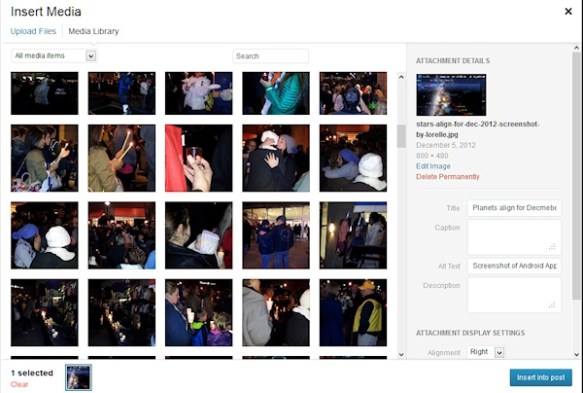
 In 2005, WordPress became modular separating the design and architecture from the core programming code.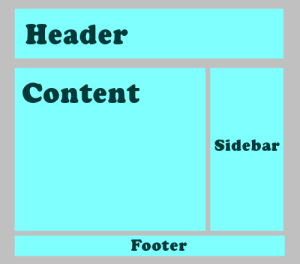
 We live in a world of ever changing terms and jargon. Let’s see if this will add to the confusion or clear things up when it comes to what to call a blog and what to call a website.
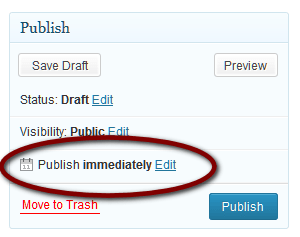 To schedule a post or Page to publish at a time before or after this moment, you may use the Schedule feature in WordPress.
 If the post or Page is a draft, the Publish button will change to read Schedule.






 Kim Greenhouse is the producer of
  Dan Portis-Cathers of
 Randy Sandberg is the Software Test Engineer of
  Jeff Brock of
  Learning from Lorelle